Coming soon for Notion agencies
Run client work in Notion. On time, on budget.
Keep the flexibility and power of Notion. ClientWise adds client and project management on top, so your people and their AI agents estimate, track and deliver every project together.
We use your email only to contact you about early access.
Homepage refresh for Brightline Studio
- Status
- In progressDone
- Assignee
- Dana
- Category
- Design
- Estimate
- 6 hoursDraftReservedCharged
- Rate
- Set when a person confirmsLocked when confirmed
Refresh the homepage hero and navigation for the spring campaign. Sample content.
- New hero layout, two options
- Navigation with five items
- Send v1 to the client for approval
Draft estimate: 6 hours. 82 hours available.
6 hours reserved. 76 hours available.
6 hours charged. 76 hours available.
- Proposed estimate, 6 hoursClaude for Dana
- Confirmed, 6 hours reservedYou
- Ran 14 min on this taskClaude for Dana
- Marked done, 6 hours chargedYou
Why ClientWise
Notion runs the work. It was not built to run the client.
Notion gives your team the freedom to work its own way. An agency also needs estimates, budgets, time, workload and client approvals. Today those sit in other tools, and the numbers stop matching.
Notion gives you
- Tasks, projects and docs
- Databases and views
- Your team's own way of working
ClientWise adds
- Estimates
- Client budgets
- Time tracking
- Workload planning
- Client approvals
- A record of people and AI agents
On time.
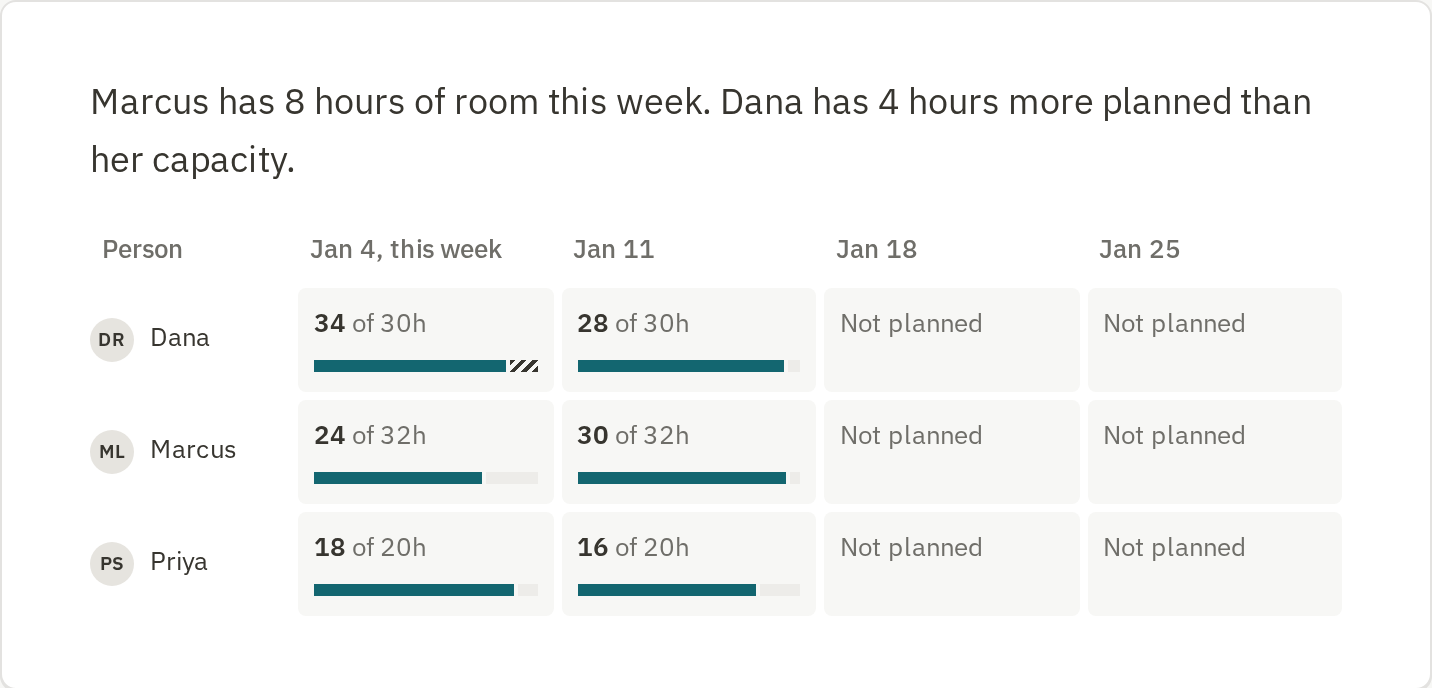
Plan each person's week from real capacity, and see who has room before a deadline slips.
On budget.
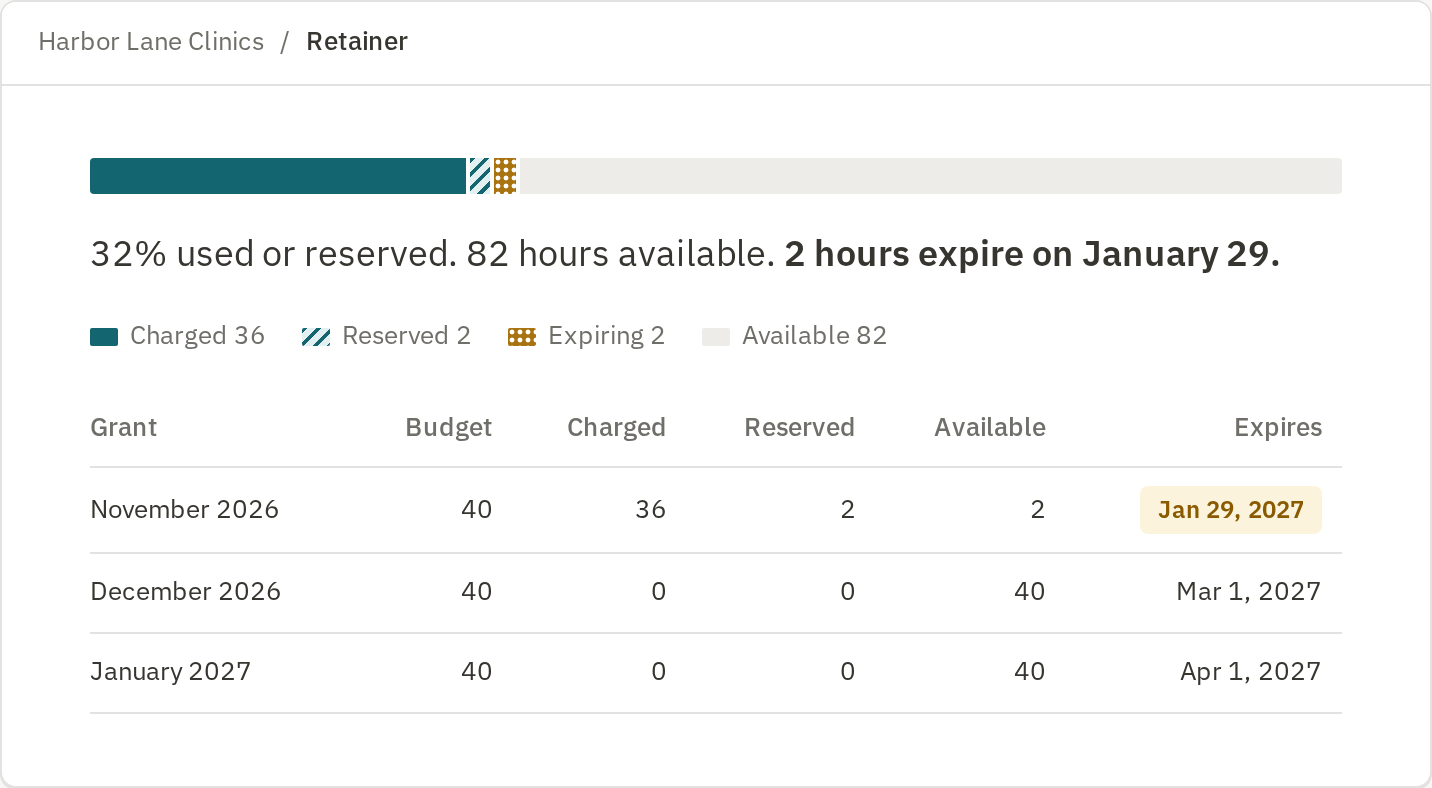
Every project shows what is charged, reserved, available and about to expire, in one bar.
On the record.
Each estimate, each hour of human and agent work, and each client decision has a line.
How it works
Notion holds the work. ClientWise holds the ledger.
Estimate
A person or an agent proposes an estimate on a Notion task. A person confirms it.
Reserve
The confirmed estimate is reserved against the client budget, and the rate locks.
Do the work
Your team and its agents work in Notion and track time there.
Charge and approve
When the task is done, the reserve becomes a charge. The client approves one stored version from a phone.
The client budget goes down by the confirmed estimate, not by tracked time. Tracked time is for your team only.
Shows up as values on your Notion tasks, embeds on Notion pages, synced Notion databases and a Chrome extension.
People and AI agents
See how everyone contributes. AI included.
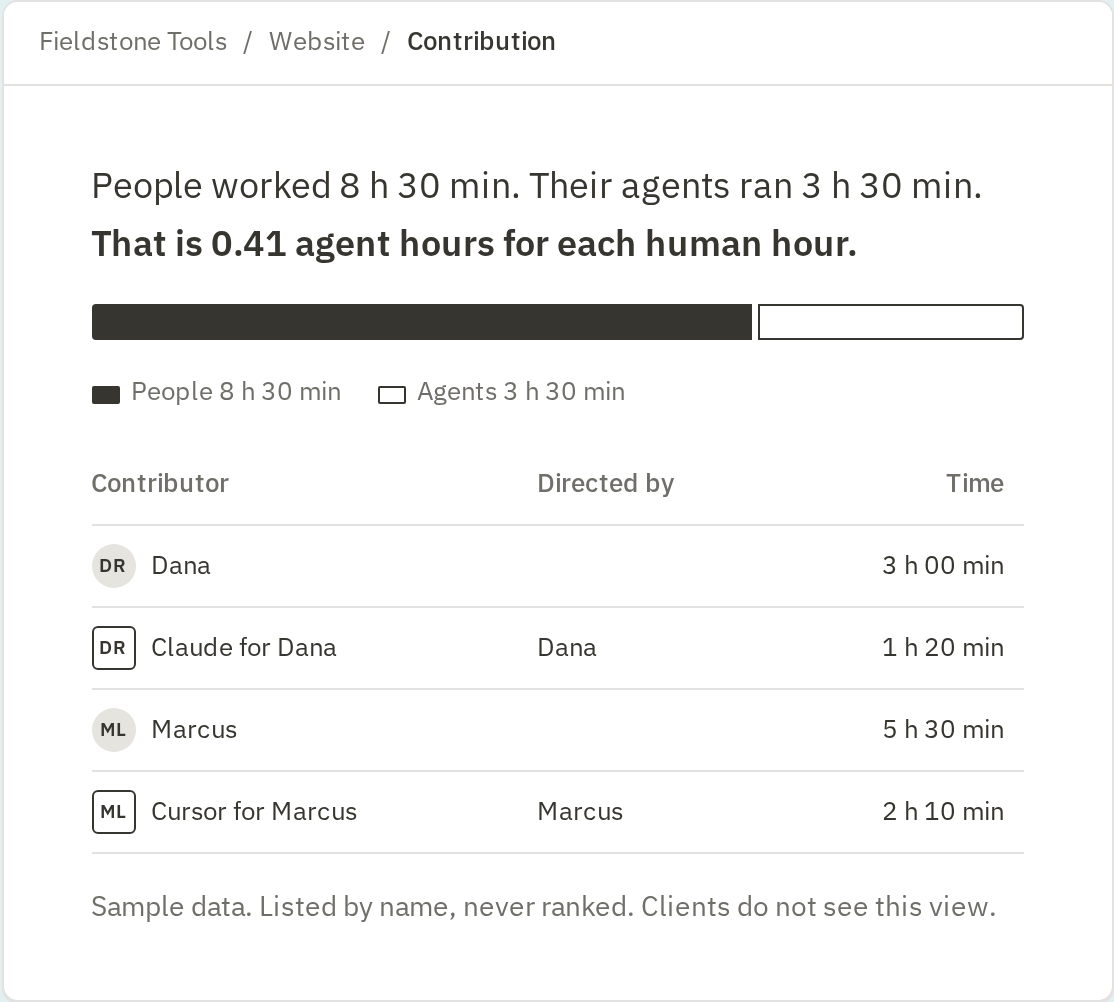
Projects now run on people and the agents they direct. ClientWise manages both on the same tasks, and shows what each one did.
Every agent is a teammate.
Claude, Cursor or any agent is its own user, with one person as its owner.
Human time and agent time, side by side.
Each task and project shows the hours people worked and the hours their agents ran.
Credit goes to both.
An agent gets credit for its run. Its owner gets credit for directing it.
The product
Inside Notion for your team. On a phone for your client.
How much is left? One look.
Each project page shows its budget as one bar and one sentence. Budget that expires next shows with its date, so nothing expires unused.
Embeds on any Notion page
Hours and percent, never dollars, in Notion
Agents propose. People confirm.
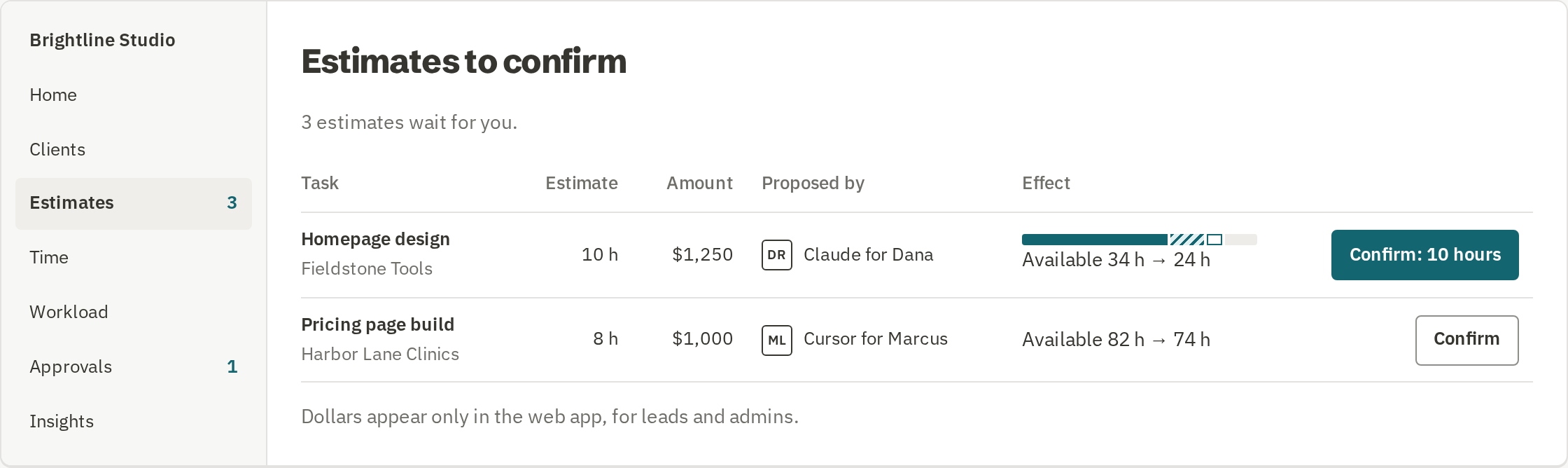
Claude or Cursor can estimate a task. The account lead sees the effect on the budget before one click confirms it.
Every line shows a person or an agent
Only a person confirms money
Who has room this week?
Workload comes from planned hours, not from thousands of task estimates. One screen, one sentence, no ranking of people.
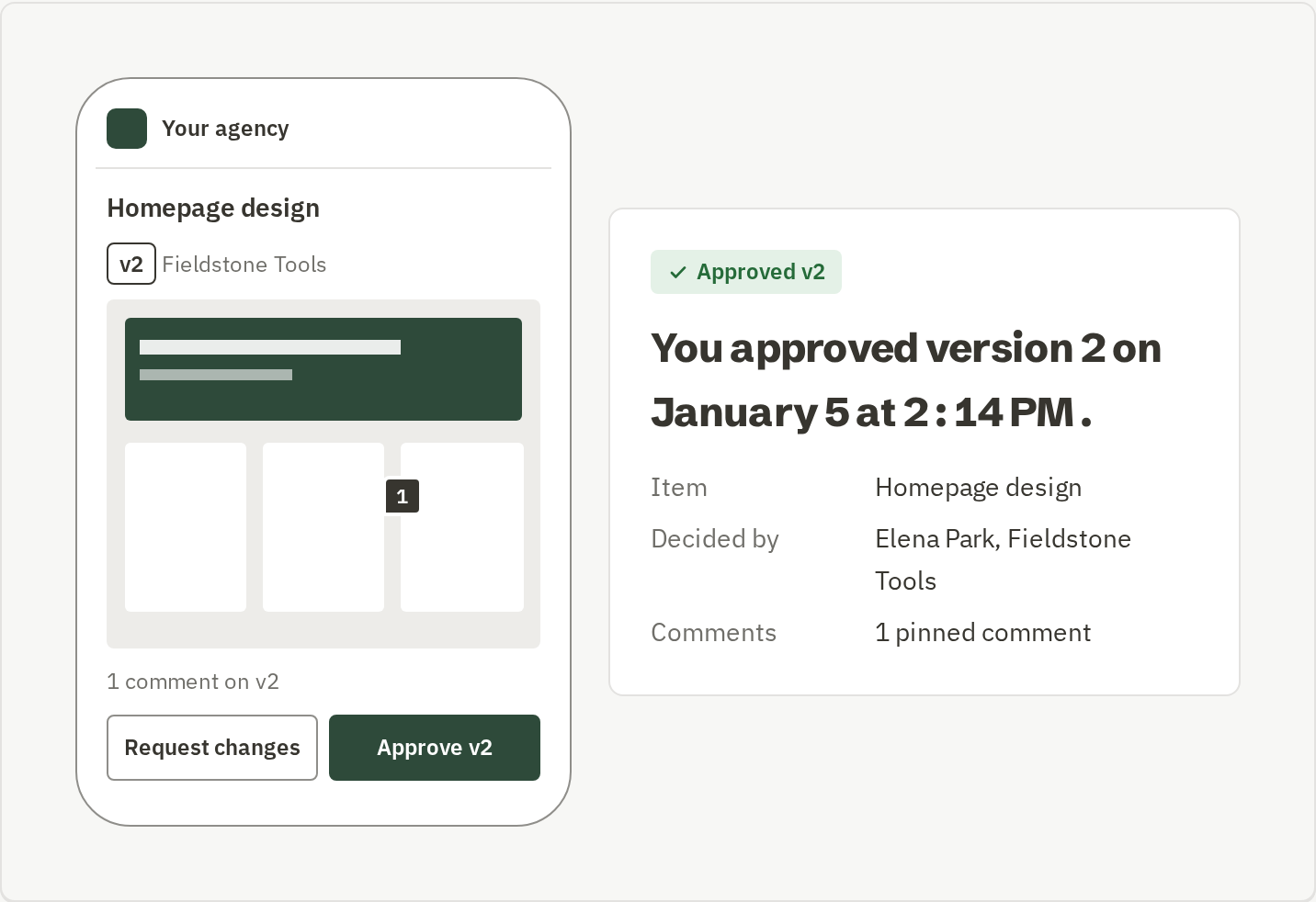
Client approval in under a minute.
The client opens one stored version on a phone, pins a comment, and decides. The decision goes on the record with the version, the person and the time.
Your logo and color, never ours
Clients see no budgets and no hours
What you get
Everything goes on the record.
The client pays the confirmed estimate.
A person confirms each estimate before the work starts. The rate locks when the work is reserved.
Your agents are on the record.
Each AI agent is its own user with a human owner. Its run time and cost go into your margin numbers.

Every charge and every client decision has a record.
The record shows who acted and when. Each client decision applies to one stored version.
hour estimate
Confirmed, reserved, then charged. Never re-billed by the hour.
- 9:14 AMPriya Shah confirmed a 10-hour estimate on Homepage design
- 11:02 AMClaude for Dana ran 1 h 20 min
- 2:14 PMElena Park approved the stored versionApproved v2
No dollar amount or rate is ever written to Notion. No screen ranks people.
Who it is for
For the people who run client work.
Agency owners
Faster delivery becomes your margin.
Account leads
Know every client balance and get approvals on the record.
Operations leads
One Tasks database for work, time, budgets and workload, inside Notion.
Agent operators
Your agents get credit, and you get credit for directing them.
Early access
Get early access.
We are setting up a small group of agencies by hand first. Join the waitlist, or ask to be a design partner.
We use your email only to contact you about early access.
Questions
What agencies ask first.
Is ClientWise a Notion template?
No. ClientWise is a separate product that connects to your Notion workspace. Notion keeps your tasks, projects and docs.
Does it replace Everhour or Toggl?
Yes. ClientWise includes time tracking in two ways: a Chrome plugin and a tracker inside the app. It tracks time for your people and your AI agents, and each client budget still draws from confirmed estimates.
Does it send invoices?
No. ClientWise holds the ledger. Your accounting tool sends invoices.
Can my clients see their budget?
Not in the first version. Clients review work and decide on one version at a time.
Will my team feel watched?
ClientWise has no view that ranks people, and only leads see velocity.
What can AI agents do?
An agent can do what its owner can do, except a short list of actions that only a person can take, such as confirming an estimate or giving a client decision.